Introducing GAIA, MyHeritage’s Groundbreaking Genealogy AI Agent


There’s nothing quite like making a new discovery about your family history… but getting there can be a challenge. You can spend countless hours searching records, comparing details, and following leads, only to come away with more questions than answers. Wouldn’t it be wonderful to have a personal genealogy researcher at your disposal, ready to do the legwork for you, piece together scattered clues, and explore promising avenues you might not have considered?
Enter GAIA, the new Genealogy AI Agent from MyHeritage. GAIA brings the power of agentic AI to family history research, marking an important step forward for genealogy. While technology has long helped genealogists find and access information, GAIA takes this a step further by actively conducting multi-step research in collaboration with you.
Simply tell GAIA, in your own words, what you’re trying to find. It will then search historical records on MyHeritage plus public repositories on the web, draw on information from your family tree, evaluate evidence, provide results, and suggest promising next steps. You guide the research, review the findings, and can easily add the details you choose to your family tree in just a few clicks.
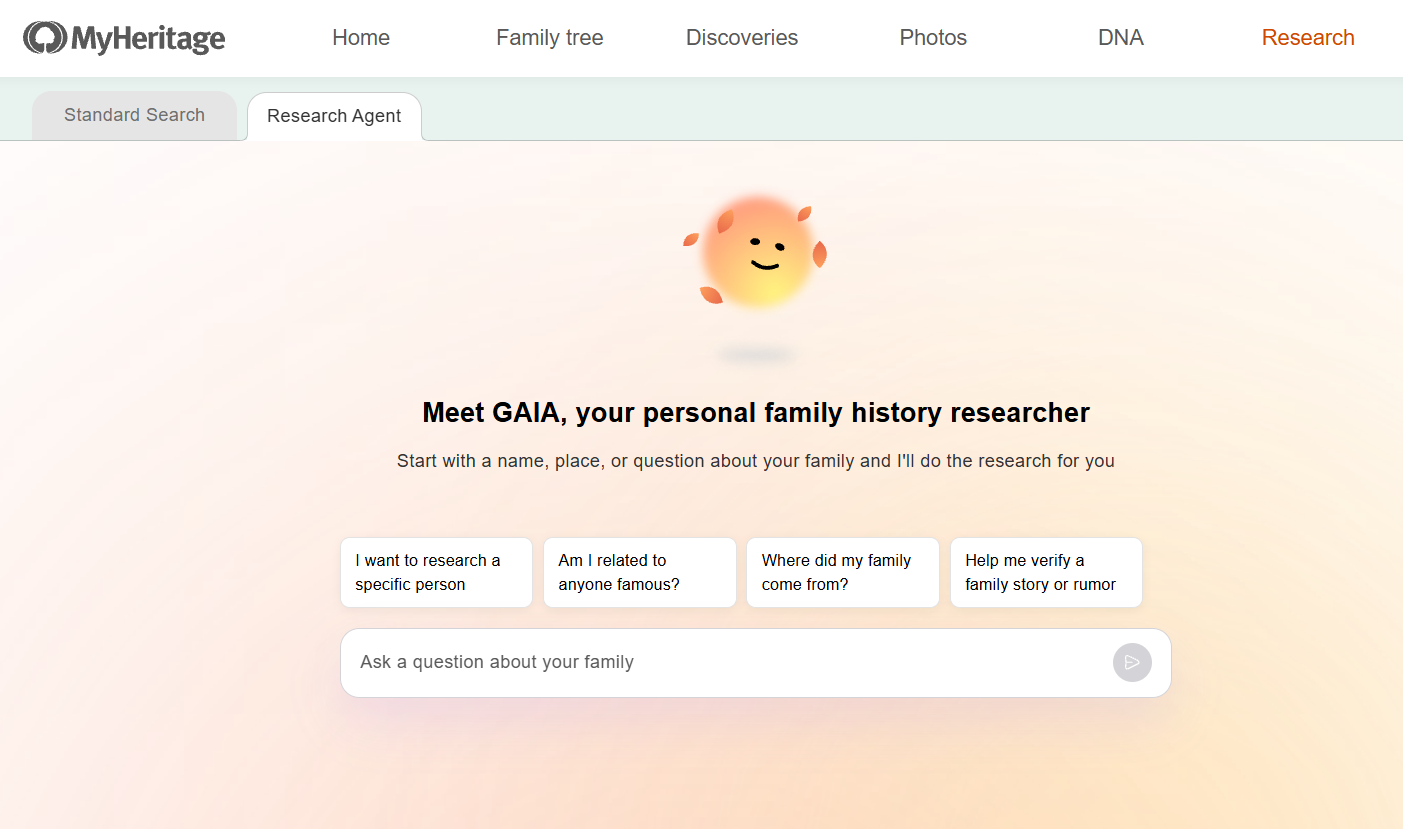
GAIA, MyHeritage’s Genealogy AI Agent (click to zoom)
GAIA is now available in English on the MyHeritage website, on desktop and mobile browsers. Support for additional languages will be added soon.
GAIA: AI research designed for genealogy
GAIA is powered by agentic AI, meaning that it can plan and carry out multiple connected tasks to achieve a goal. Unlike general-purpose AI platforms like ChatGPT, Gemini, or Claude, GAIA is built specifically for genealogy. It approaches research like a professional genealogist, using established research methods to evaluate evidence, cross-check information, and assess possible connections. For example, it treats information from other users’ family trees as less reliable clues to investigate rather than as established facts. GAIA presents the supporting evidence, distinguishes between well-supported findings and uncertain possibilities, and indicates its confidence in the results.
Another major advantage is GAIA’s integration with your MyHeritage family tree. It uses information you’ve already entered to guide its research, then lets you compare its findings with your family tree and select which details to add. Throughout the research, GAIA asks questions, helps resolve conflicting information, and suggests next steps, while leaving you in control of the research and any changes to your family tree.
What can GAIA help you discover?
GAIA can assist with a wide range of family history questions, whether you’re just beginning your research or have years of experience.
You can use GAIA to:
- Make progress on challenging research questions: Investigate an elusive ancestor or a longstanding family mystery using sources and research approaches you may not have considered.
- Find historical records: Search for birth, marriage, death, census, immigration, and other records that may contain information about your relatives.
- Analyze conflicting information: Compare records with different dates, names, or family relationships and examine the evidence for each possibility.
- Explore an ancestor’s movements: Trace possible connections between records from different locations and investigate migration patterns and surname variations.
- Confirm existing research: Find supporting evidence for information you’ve already discovered and identify gaps that still need attention.
- Identify new research directions: Locate archives, repositories, and other resources that may hold additional information, even when the records themselves aren’t available online.
GAIA doesn’t always find a definitive answer, and a productive research session doesn’t necessarily result in a new relative or previously unknown fact. Confirming a family connection, ruling out an incorrect match, or discovering a promising place to search can be equally valuable.
How to use GAIA
To start a research session with GAIA, visit myheritage.com/research and select the “Research Agent” tab. Alternatively, write an initial question below “TRY OUR RESEARCH AGENT.”
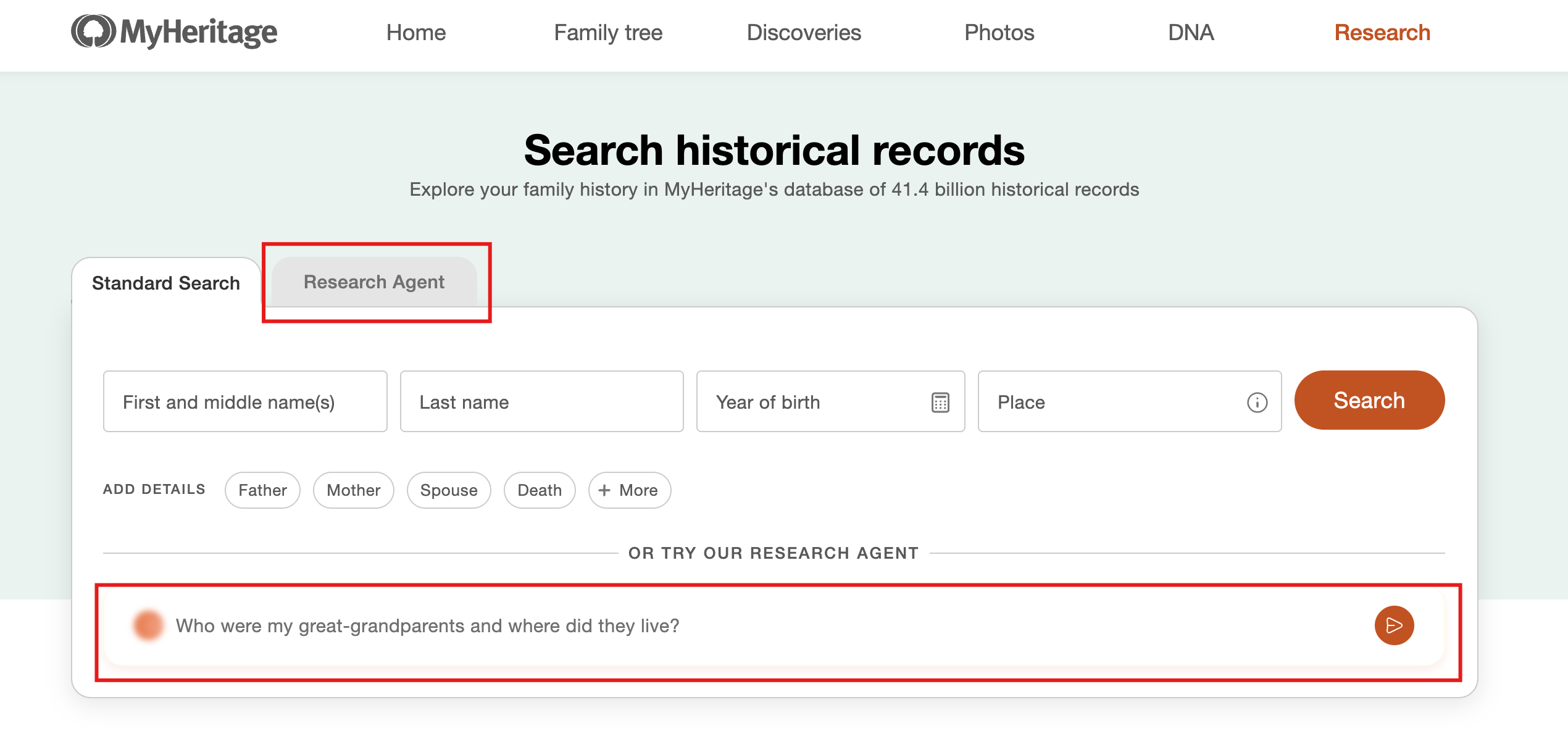
Accessing GAIA from the Research page on MyHeritage (click to zoom)
The first time you use GAIA, you’ll be asked to review and accept its terms of use.
Enter your research question in everyday language. You don’t need to know which historical record collections to search or how to formulate a complex search query.
GAIA can draw on details already recorded in your MyHeritage family tree, so there’s no need to enter them again. Include any additional information you know, such as names, approximate dates, locations, or family relationships, to help guide the research.
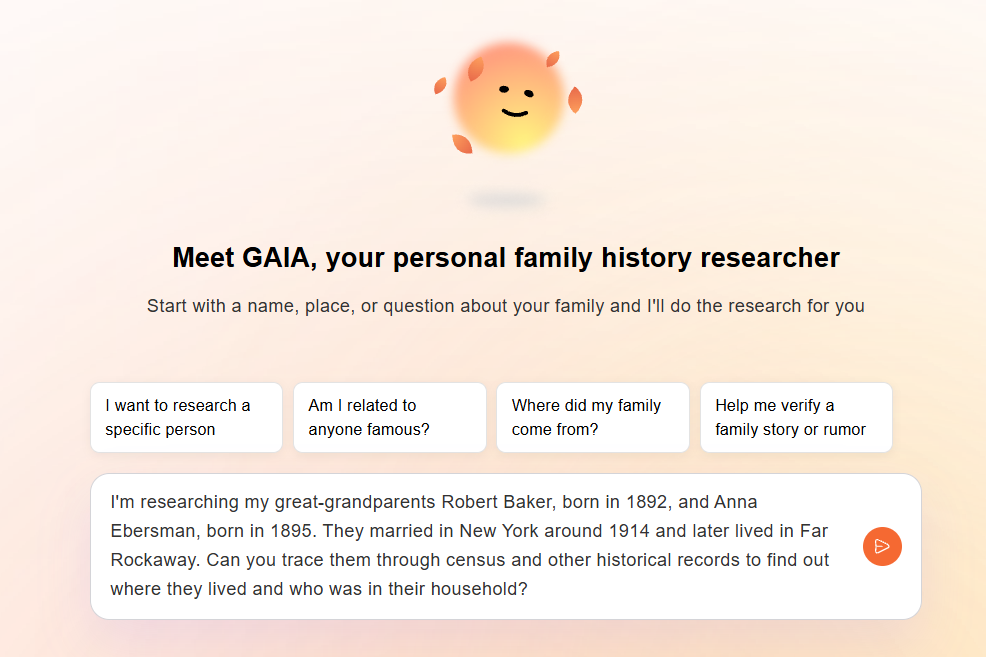
Example research question entered into GAIA (click to zoom)
GAIA analyzes your request and determines how to approach the research. It may ask questions to clarify what you’re looking for, or, if your request is clear, jump right in and get to work.
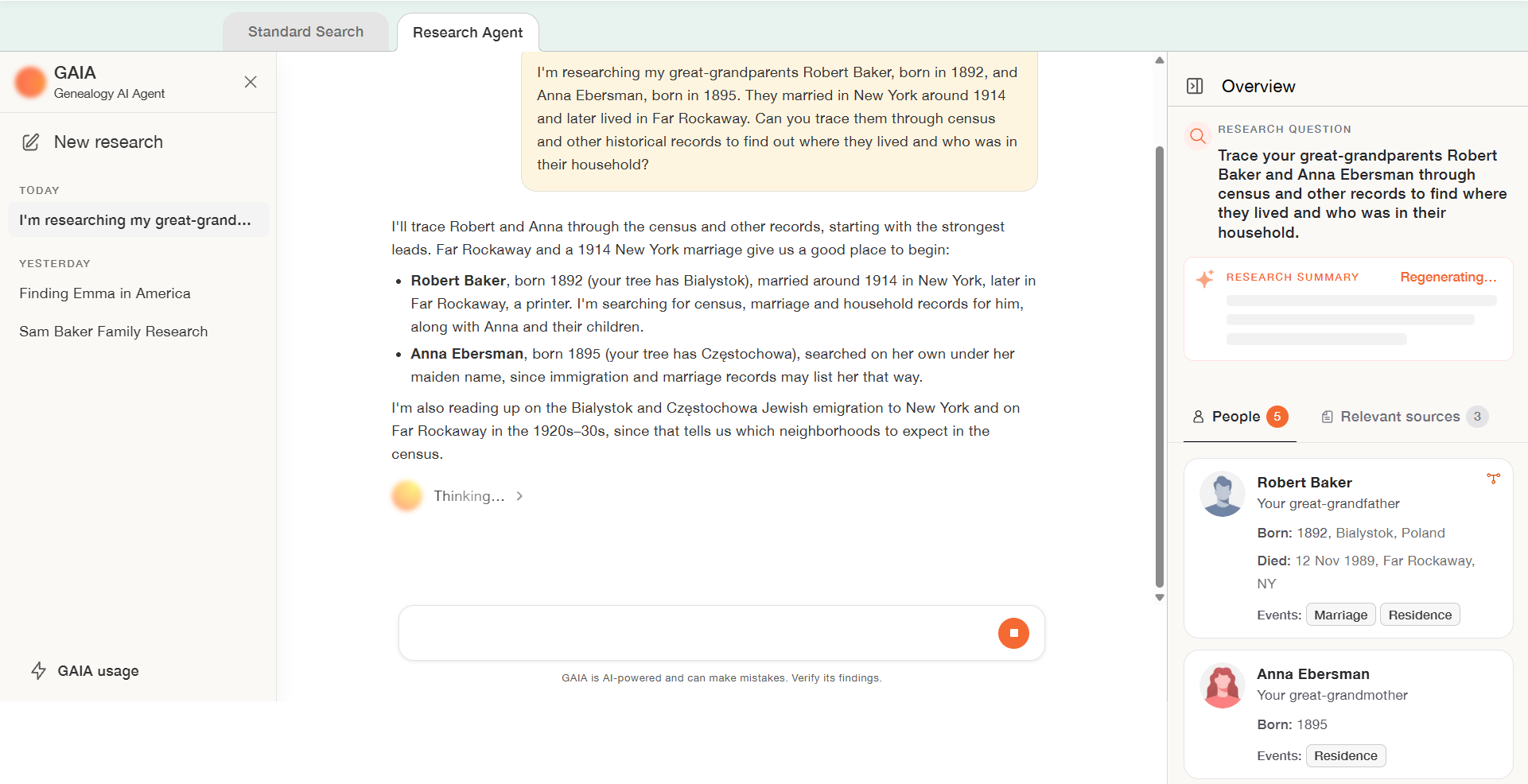
GAIA at work investigating a research question (click to zoom)
GAIA searches MyHeritage’s full range of historical records, as well as relevant public repositories on the web. Along the way, it evaluates potential matches, compares names and dates, examines relationships, and considers which sources may help answer your question.
Follow its progress in the conversation as it carries out searches and examines the information it finds.
Reviewing GAIA’s findings
As GAIA progresses through its research, it presents its findings in clear, conversational language, together with the sources that support them.
Each relevant source is identified by type, so you can distinguish between historical records, information from other family trees, and external websites. GAIA also assesses its confidence in the findings and explains their relevance to your research.
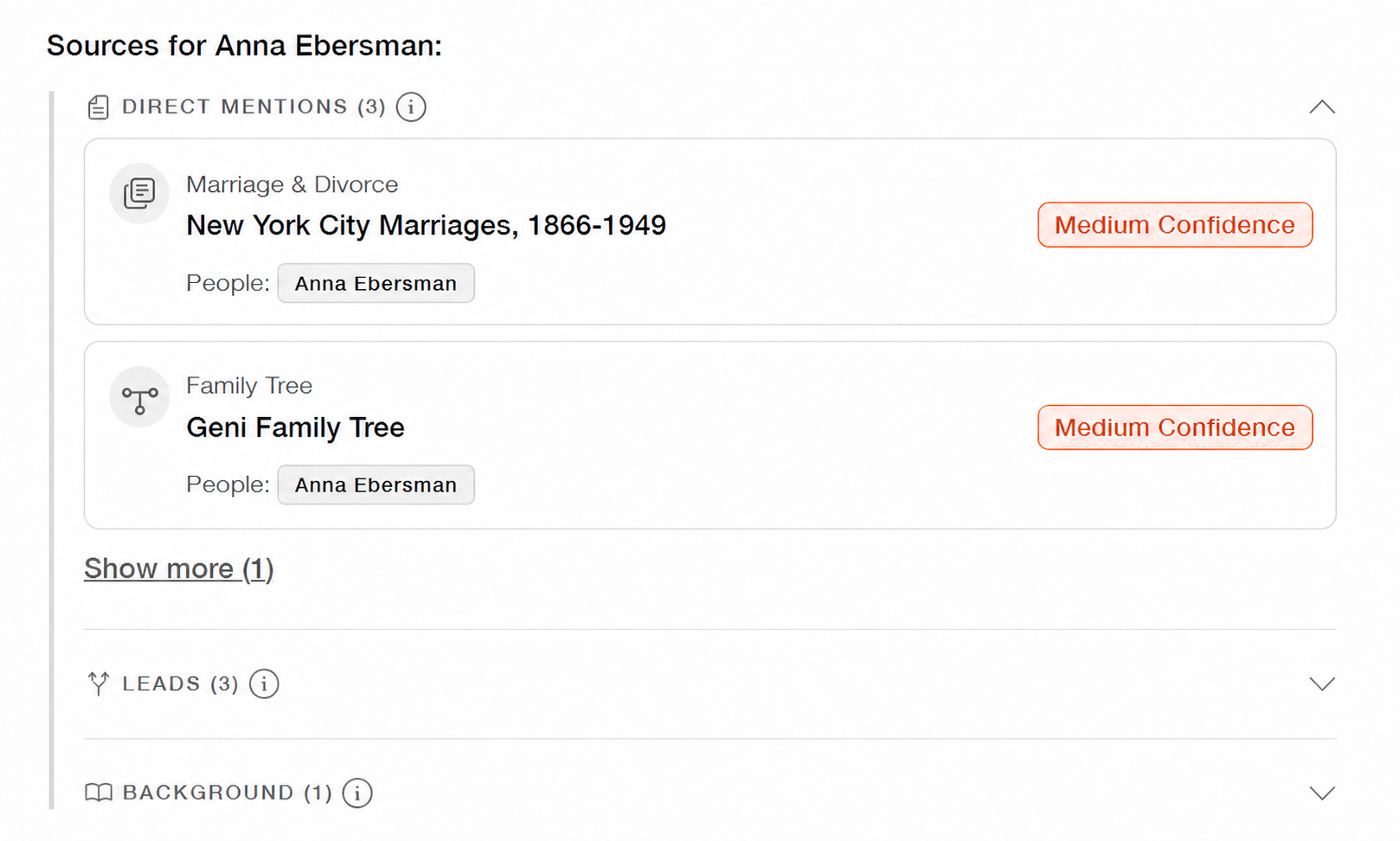
Sources presented within GAIA’s response (click to zoom)
Click on each source to examine the findings yourself. A pop-up window appears with the information provided in the record and access to the scanned image, if available.
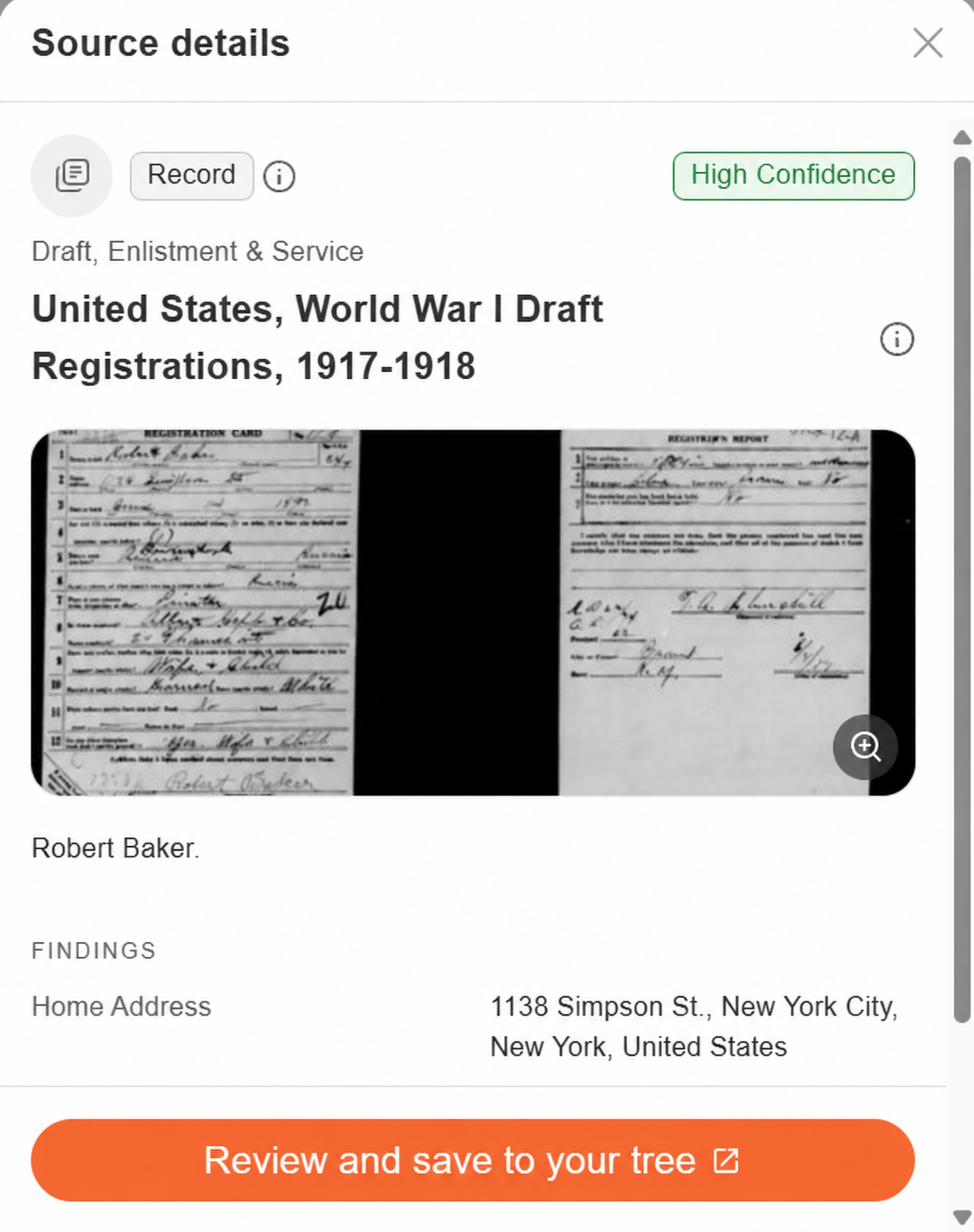
Reviewing sources that GAIA found (click to zoom)
Clicking “Review and save to your tree” will take you to the full record page. You can scroll through the various sources GAIA found using the arrows at the bottom.
GAIA’s findings can include several different kinds of sources:
- Direct mentions: Sources that specifically mention a person you’re researching.
- Leads: Archives, repositories, or other places where additional information may be available. For example, GAIA might identify an archive that holds relevant documents but requires a separate search or a direct request to obtain them, which GAIA cannot automate for you.
- Background information: Historical context that can help explain an ancestor’s circumstances, such as migration patterns, local history, surname information, or the conditions in a particular place and period.
Together, these sources can help you understand what the available evidence suggests and where further investigation may be worthwhile.
Reviewing your research in the Overview panel
GAIA keeps track of the research as it progresses in the Overview panel on the right side of the screen, so you don’t have to scroll through an entire conversation to reconstruct what you’ve learned.
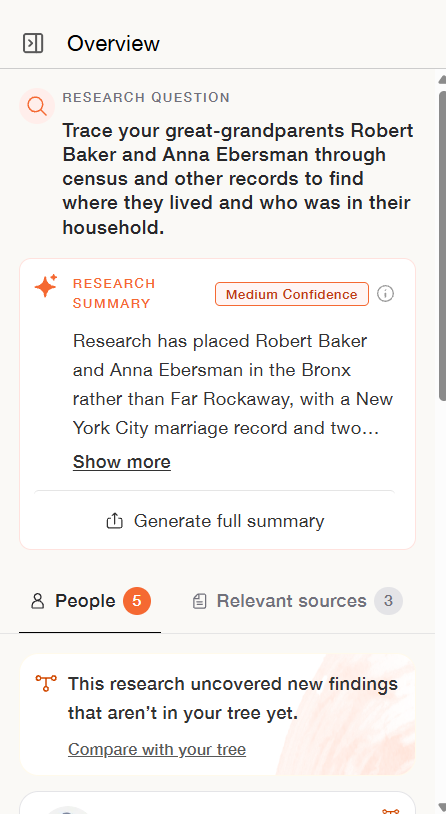
GAIA’s Overview panel
The Overview panel organizes the information into several useful sections:
Research question: A summary of the question you’re exploring in this session.
Research summary: An automatically updated summary of the research and its key findings. You can also generate a more comprehensive research report.
People: A list of individuals identified during the research, along with the information and relationships associated with them. Click on a person to see all the details about this person that were uncovered during the research as well as the sources and relatives associated with him or her.
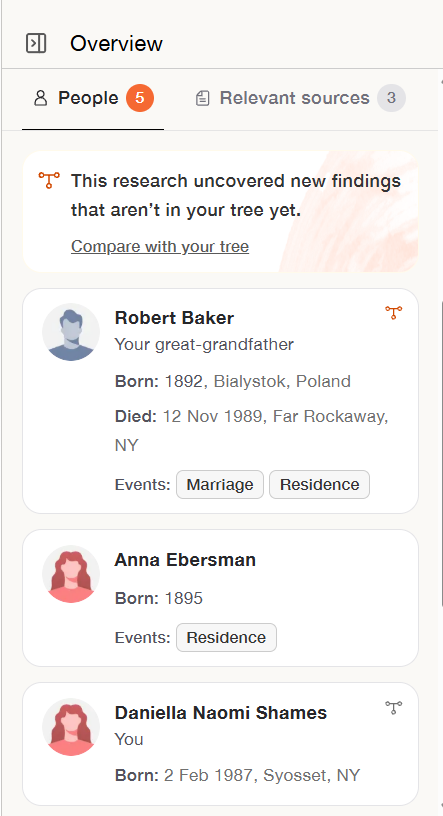
GAIA Overview panel: People
Relevant sources: The records and other sources that GAIA considers relevant to the research, along with confidence assessments and explanations of how they support the findings. The list of sources can be filtered according to source type and sorted according to various criteria, such as how old the source is and GAIA’s level of confidence in its relevance.
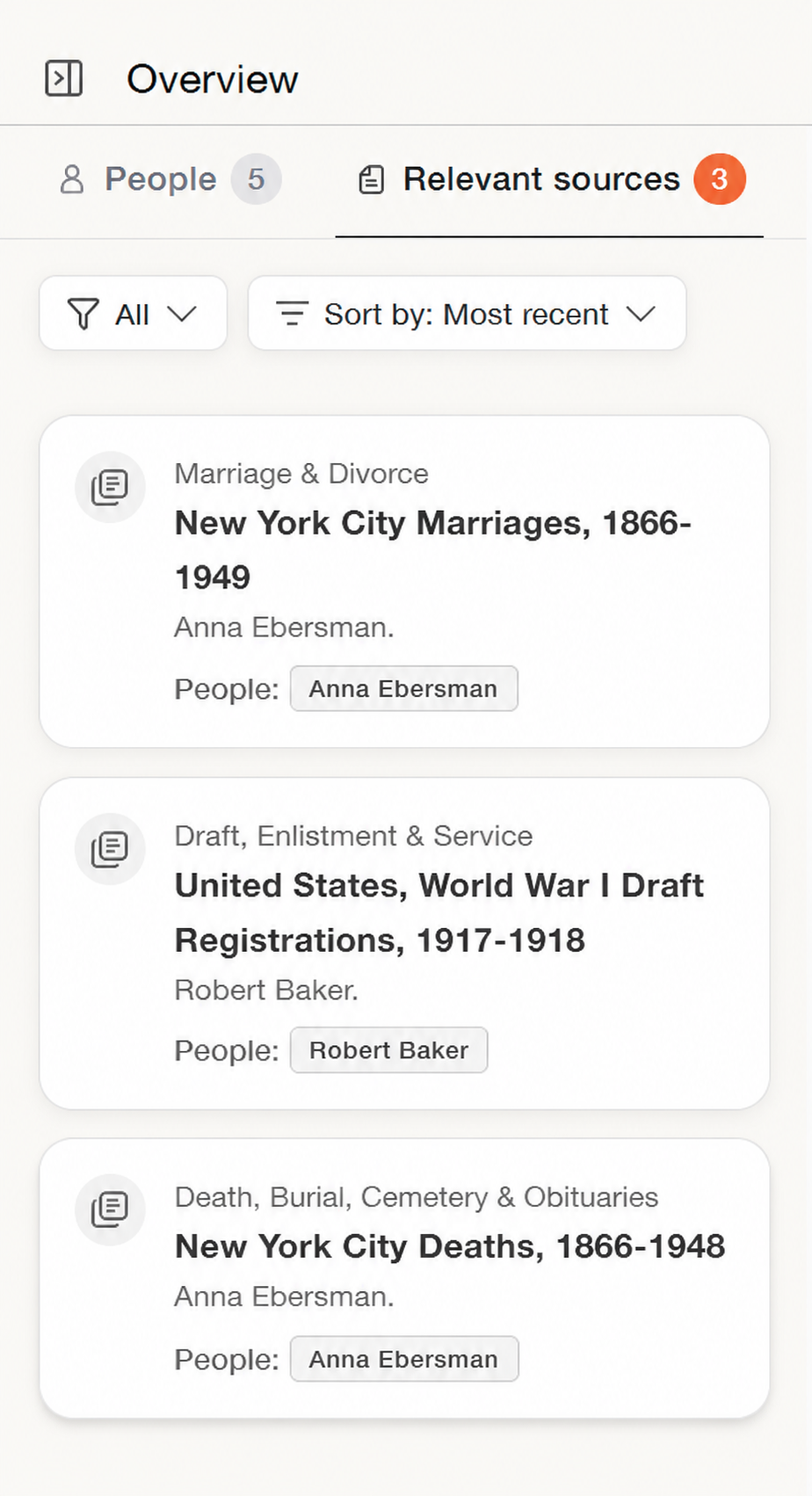
GAIA Overview panel: Relevant sources (click to zoom)
This organized view makes it easier to review what GAIA has discovered, examine the evidence, and identify questions that remain unanswered.
Continuing the conversation
Genealogical research rarely follows a straight line. A promising record may raise new questions, and an unexpected detail may change the direction of the research.
GAIA is designed to work through these developments with you. It may suggest additional searches, ask you to confirm uncertain information, or recommend pursuing a newly identified relative or source.
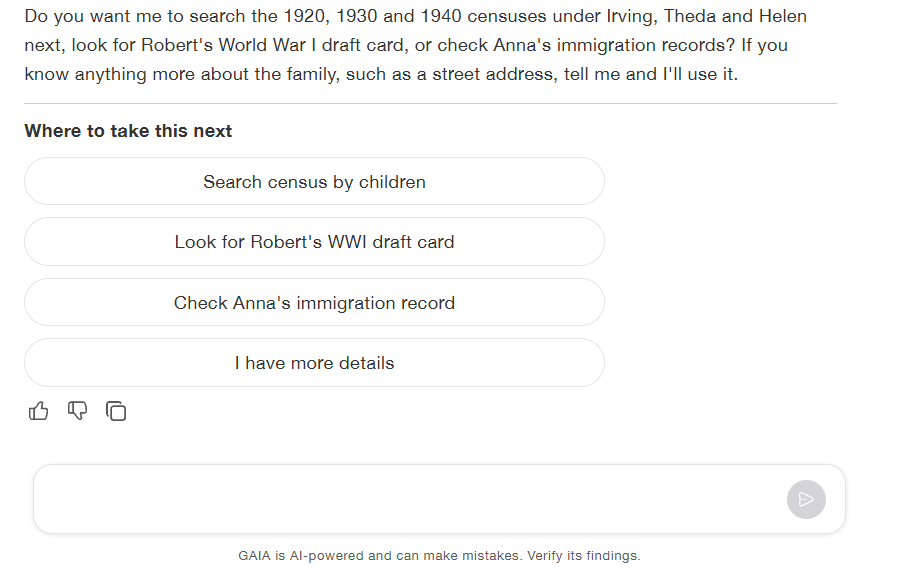
GAIA suggests next steps (click to zoom)
You can click on one of the provided suggestions to prompt GAIA to take that step. In the example below, the second option was selected (look for a WWI draft card), and GAIA automatically used it as the next question:
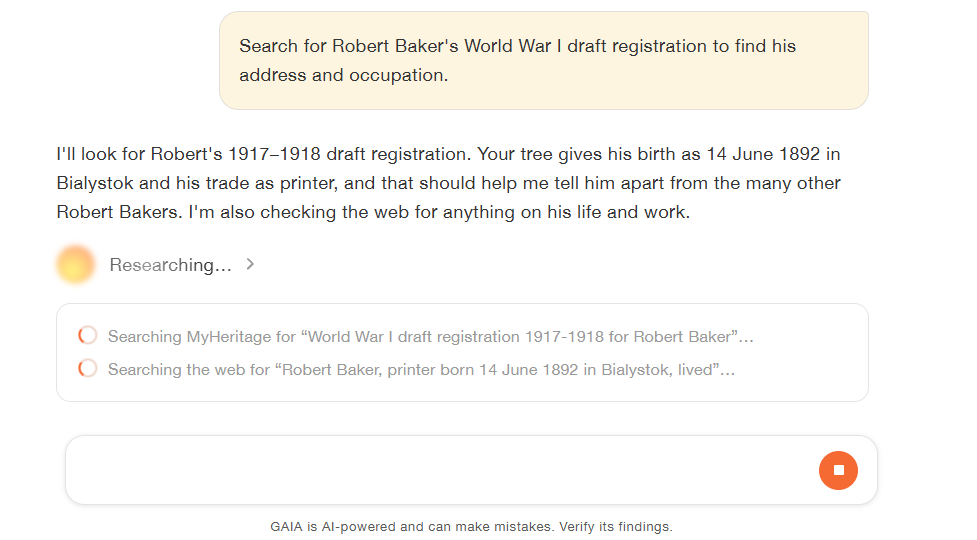
GAIA takes the next research step (click to zoom)
You can also type freely: provide additional details, correct an assumption, explain why a particular record doesn’t match, or ask GAIA to explore a different possibility. It uses your feedback to adjust the research.
Your conversations are saved, so you can return to an earlier research session and pick up where you left off. You can also start a new conversation for a different research question by clicking “New research” on the left-hand panel.
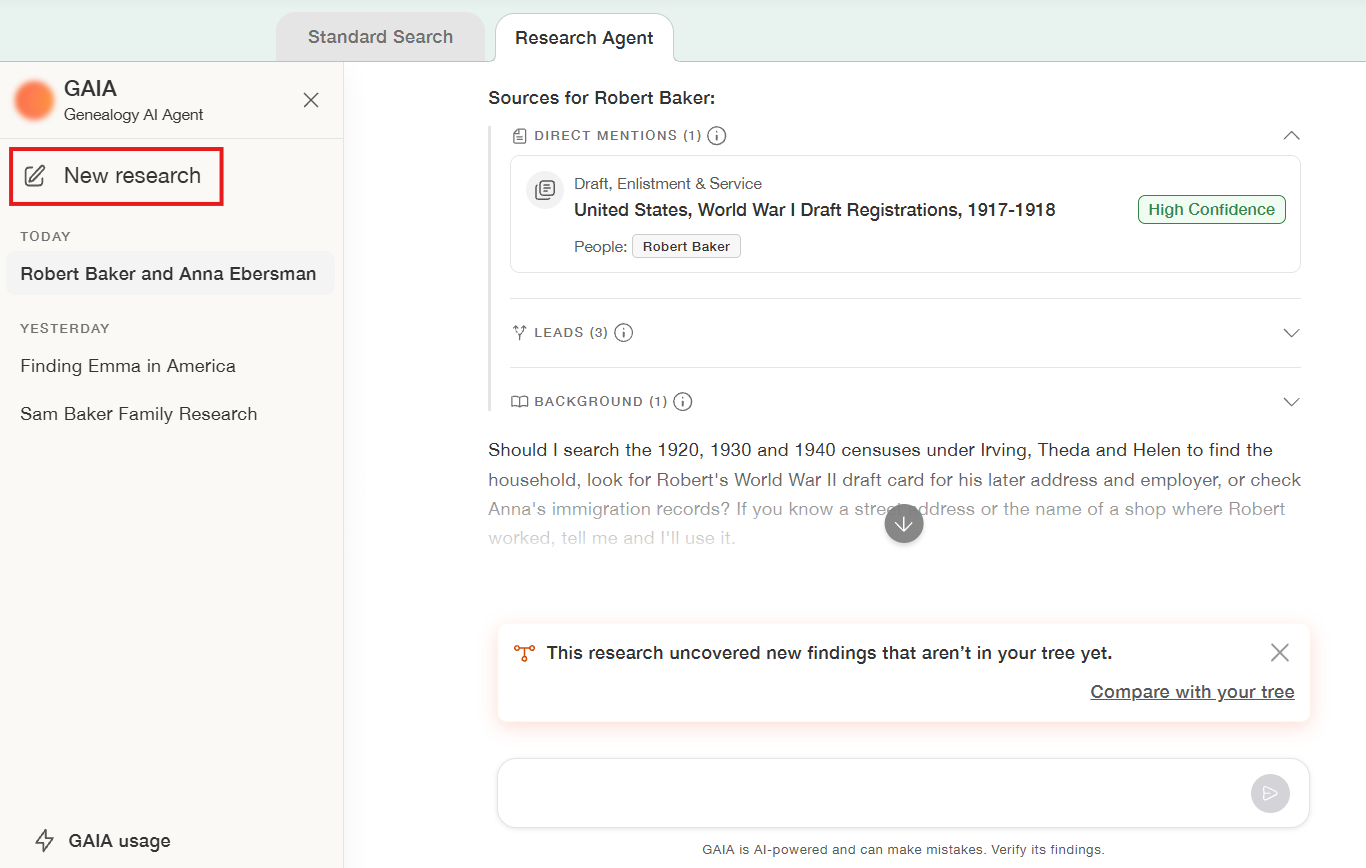
Starting a new research session with GAIA. Former conversations are listed too and can be resumed (click to zoom)
Adding your findings to your family tree
One of GAIA’s most useful capabilities is its integration with your MyHeritage family tree.
When you research someone already in your family tree, GAIA can use the information you’ve entered about that person and close relatives to inform its research. As it identifies new information, it can help you compare those findings with what’s already recorded.
Click “Compare with your tree” (when offered) to review the differences. GAIA organizes the findings by person and identifies information that is new, improves an existing detail, or conflicts with something already recorded in your family tree.
You can examine the supporting sources and choose exactly which findings to save. Click “Save to your tree” to update your family tree with the information you’ve approved.
GAIA never automatically adds or changes information in your family tree without your explicit approval. It’s always up to you.
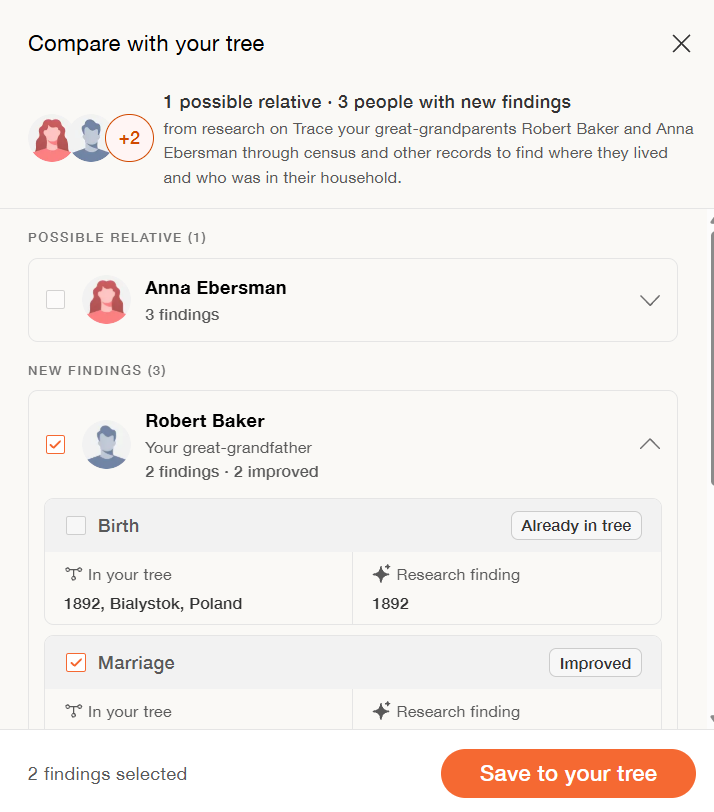
Selecting findings to save to the family tree (click to zoom)
If you don’t yet have a family tree on MyHeritage, GAIA can also help you create one using the people and relationships identified during your research. This gives you a way to preserve your findings, organize family relationships, and continue researching through MyHeritage.
What early users are saying about GAIA
GAIA has already been beta-tested by genealogists and family history enthusiasts, and their experiences demonstrate how it can help with a variety of research challenges.
Experienced genealogist James Tanner of Genealogy’s Star was impressed by the way GAIA guided his research: “As I began using GAIA, I was impressed by the questions it asked to advance the research. Its conclusions were consistent and well-grounded. GAIA provided details on children that were absent from my own files.”
Tina LaFreniere, founder of RelatedFaces.com, was similarly enthusiastic: “With its natural, conversational style, GAIA is an extraordinary new tool poised to become an indispensable research companion for genealogists.”
For Kathy, who had spent decades researching a particularly difficult ancestor with numerous name variations, GAIA demonstrated how much time it could save: “It’s taken me a couple of decades to find these records, and GAIA found them in just a few minutes.”
David Wilson particularly appreciated GAIA’s ability to handle challenging historical records: “I’ve been doing family history before, and GAIA has totally changed the game… It’s often found records I never would have thought to search for. I can’t imagine working without GAIA anymore.”
Tips for getting the most out of GAIA
For a productive research experience, here are useful recommendations:
- Start with a specific question. Rather than asking GAIA to research your entire family history, focus on one ancestor, relationship, event, or mystery at a time.
- Share what you already know. Names, approximate dates, locations, relatives, and alternative spellings can help narrow the search and distinguish between people with similar names.
- Keep each conversation focused. GAIA maintains a separate research summary, list of people, and collection of sources for each conversation. Starting a new conversation for a different question keeps your research organized and helps GAIA focus on the right details.
- Review the supporting evidence. GAIA is designed to evaluate sources carefully, but its findings should still be verified, especially when the evidence is incomplete or conflicting.
- Help guide the research. If you already have a particular record, know that a suggested match is incorrect, or want to explore another possibility, tell GAIA. Your input helps it refine the research and focus on the most promising leads.
Cost and availability
GAIA uses advanced AI technology to carry out multi-step research. The required processing cost (for MyHeritage) varies according to the complexity and depth of each research session, but is generally quite expensive.
All active MyHeritage subscribers receive a complimentary GAIA usage allowance, giving them an opportunity to experience the feature for free. The amount of research you can complete with this allowance varies depending on the complexity of your questions and the research.
You can check your remaining usage through the “GAIA usage” option in the left-hand panel.
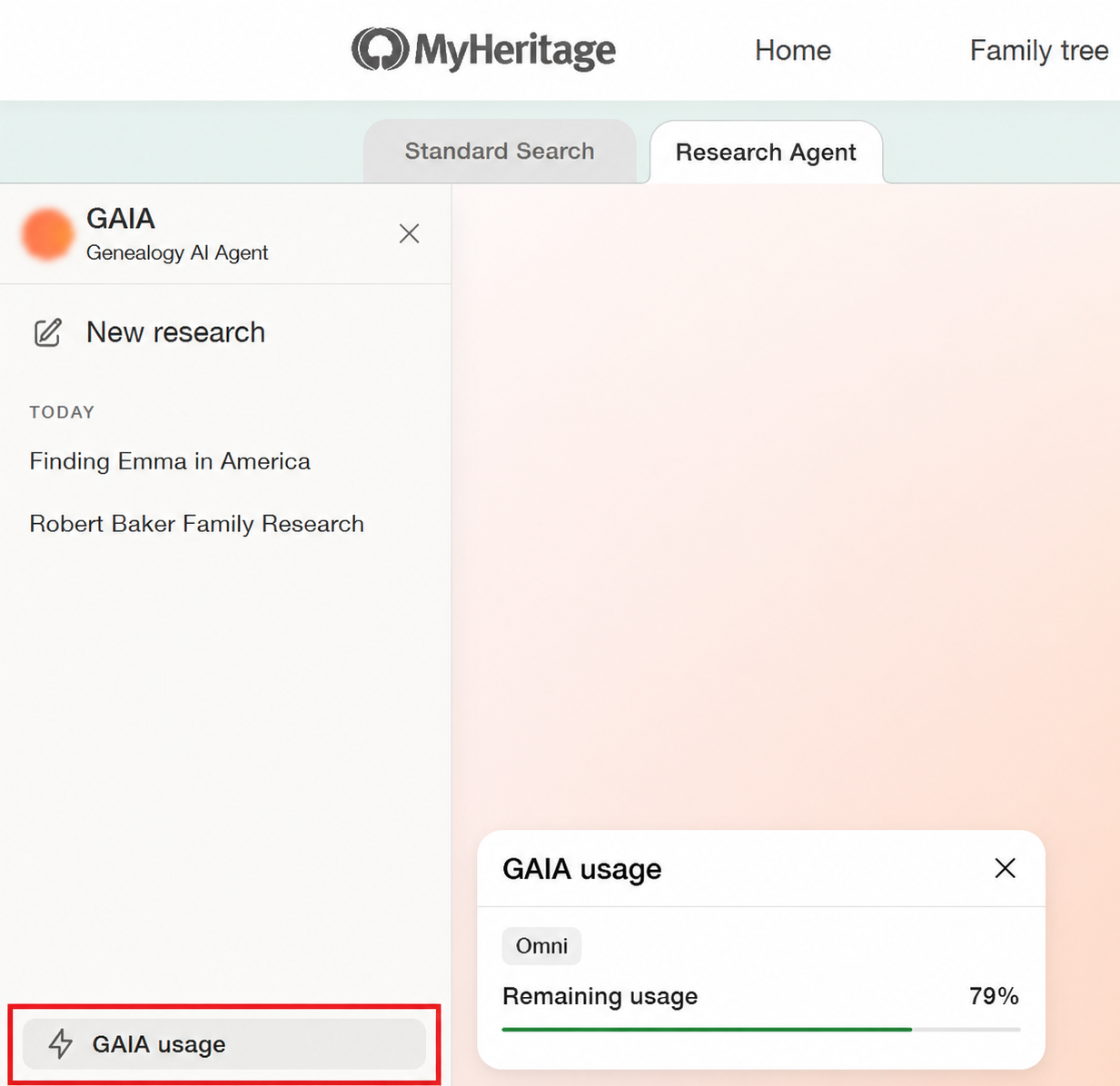
Checking your remaining GAIA usage (click to zoom)
To continue researching after using the free allowance, MyHeritage offers two plans with extended GAIA access:
OmniAI includes all the benefits of the MyHeritage Omni plan, along with an extended GAIA usage allowance.
OmniAI+ provides an even larger allowance for people who want to use GAIA more extensively.
If you reach your usage limit, GAIA explains your available upgrade option so you can continue researching.
These plans make it possible to offer powerful AI research capabilities while accounting for the substantial computing resources required. MyHeritage plans to expand its AI offerings in the future, so that OmniAI and OmniAI+ subscribers will benefit from more ways to use their AI allowance and even greater value from their plans.
Privacy and responsible AI use
GAIA is designed to support careful, evidence-based genealogical research, with users retaining control over their findings and family trees.
Before using GAIA, you’re asked to consent to the processing of information by external AI systems used to provide the service, and are guaranteed that information you provide during your interactions with GAIA is never used to train AI models.
Although GAIA is designed to examine evidence carefully and indicate uncertainty, AI-generated responses can sometimes contain errors. Always review supporting sources and verify important findings before adding them to your family tree.
FAQs about GAIA
How is GAIA different from using other AI platforms for genealogy research?
GAIA is custom-built for genealogy, and possesses direct access to MyHeritage’s billions of historical records, specialized knowledge of genealogical research methods, and integration with your family tree. General-purpose AI platforms like ChatGPT, Gemini, and Claude don’t have this, so they are not positioned well to answer many genealogical research questions.
Can I use GAIA if I don’t have a family tree on MyHeritage?
Yes. You can start researching with GAIA even if you haven’t created a family tree. If GAIA identifies enough connected relatives during your research, it can also help you create a MyHeritage family tree based on the information you’ve gathered.
What if I have more than one family tree on MyHeritage?
GAIA currently works with the default family tree on your default family site. We’re planning to introduce the ability to select which family tree GAIA uses for research.
Can GAIA find records that aren’t available on MyHeritage?
Yes. GAIA searches not only MyHeritage’s historical records and family trees, but also publicly available information on the web. However, GAIA cannot access external information that requires separate subscriptions for access. In such cases, GAIA may give you suggestions on where you can continue your research manually.
What’s next for GAIA?
We’re just getting started with agentic AI for genealogy. Based on feedback from users, we’re working on improvements that will give you greater control over your research, such as the ability to exclude other people’s family trees from searches. Support for additional languages is also planned.
Looking further ahead, MyHeritage is exploring how agentic AI could enhance other areas of family history, including DNA, photos, and matches. GAIA is the first step in this broader vision.
The beginning of a new era in family history research
We believe that AI is an ally, rather than an enemy, of genealogical research. GAIA marks an important step forward in MyHeritage’s ongoing efforts to make family history research more accessible, efficient, and rewarding. Bringing an AI research agent into the process makes it possible to tackle questions that may once have felt too complicated or time-consuming to pursue. The goal is to help you spend less time on the painstaking work of searching and comparing records, and more time exploring the discoveries and family stories that make genealogy so meaningful.
Whether you’re investigating a family mystery, looking for an elusive record, or searching for new directions in your research, GAIA offers a powerful way to pursue the answers you’re seeking. Give it a try. Your next discovery could be just a conversation away.