New: Turn Your MyStories Book Into an Audiobook

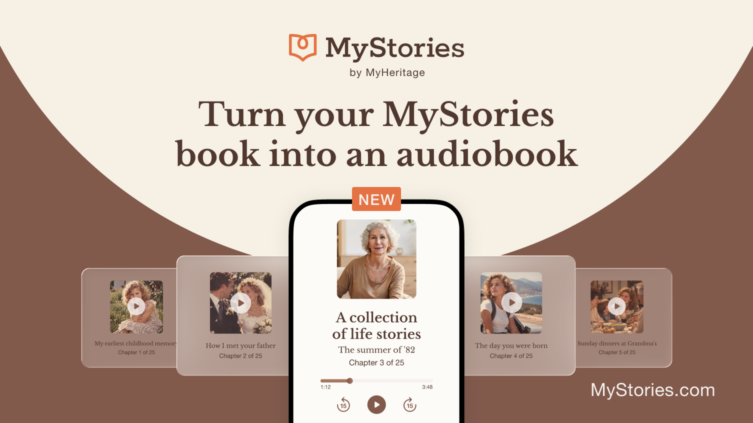
Creating a MyStories book about your life story lets the people you love experience your memories in your own words. Now, we’re excited to introduce a new way to do so: you can turn your book into a complete audiobook in a matter of minutes using AI narration.
Create your book on MyStories now with a 15% discount
Choose a natural-sounding AI narrator to read your stories, or create a version of your own voice — or that of the loved one who wrote the book — from a short recording, and use it to narrate the entire book. There’s no need to spend hours recording every chapter yourself or hire a professional narrator and audio producer. In just a few minutes, MyStories can generate a polished audiobook you can listen to from beginning to end, download to enjoy anytime, and share with family and friends.
The audiobook complements the other ways MyStories brings your memories to life. Your printed book gives you a tangible keepsake to hold and pass down, while voice recordings let you preserve moments of the storyteller speaking in their own voice. Now, the audiobook gives family members another way to enjoy the complete collection, whether during a long drive, a quiet moment at home, or simply whenever they’d rather hear your stories than read them.
How AI narration works
Creating a complete audiobook traditionally means spending hours recording the book yourself or hiring a professional narrator, which can be costly. AI narration offers a much simpler alternative: it generates natural-sounding speech directly from the written text of your stories. Using advanced text-to-speech technology, your entire book can be transformed into an audiobook in just a few minutes.
For a narrator voice, the AI analyzes the text and generates spoken narration that reflects the rhythms and intonation of natural speech, using a voice you select.
Voice cloning takes this technology a step further. Instead of using an existing narrator voice, the AI creates a voice model based on a short recording. You simply read a provided passage aloud for around a minute, and the technology analyzes characteristics of your voice to create a model that can narrate the written text of the book.
How to create your audiobook
To turn your completed book into an audiobook, visit the MyStories dashboard and select “Create audiobook.”

Creating an audiobook on MyStories
Set a narration voice
First, choose a voice to narrate your audiobook. You can choose from among a variety of natural, expressive narrator voices, or clone a real voice.

Selecting a stock AI narrator for your MyStories audiobook (click to zoom)
When using a stock narrator’s voice, you can listen to a demo of each option. Once you’ve selected your favorite, click “Save & Continue.”
If you prefer a cloned voice, you’ll need to record a voice sample. Simply click or tap record and read the provided text aloud.

Cloning a voice for a MyStories audiobook (click to zoom)
Check the boxes to confirm that you have permission to clone this voice and will use it for the audiobook only, then click “Save & Continue.”
Choose the stories to include
Next, select the stories you want to include in your audiobook. Your selections can be different from the printed version of your book, so you can tailor the audiobook to include exactly what you want your listeners to hear. You can also choose whether to include your dedication.

Selecting the content of your MyStories audiobook (click to zoom)
Review your audiobook
Before generating the audiobook, review the final content and listen to a sample of your stories in the voice you selected to hear how the narration sounds.

Reviewing your MyStories audiobook (click to zoom)
Once everything looks and sounds right, check the box to confirm that the content is final, and continue to checkout to complete your purchase and generate the audiobook.
An average-length audiobook should be ready within just a few minutes.
Listening to and sharing your MyStories audiobook
Once your audiobook has been generated, you can access it anytime from your dashboard:

Accessing your audiobook on MyStories (click to zoom)
From there, you can listen to the full book or to individual chapters:

Your audiobook on MyStories (click to zoom)
You can also download the full book or individual chapters as MP3 files to listen to on your computer or mobile device, save for later, or send to family and friends.
Frequently asked questions about MyStories audiobooks
How long does it take to generate an audiobook?
An average-length audiobook should take no more than a few minutes to generate once you’ve completed the setup and purchase.
How much do I need to record to create a cloned voice?
You only need to make a short recording by reading the passage provided. A recording of around 60 seconds is recommended for the best results.
Can I make changes to my audiobook later?
Yes. If you want to use a different voice, change the stories included, or generate a new version after editing your book, you can create another audiobook for $39. Your previous version will remain available in your audiobook history. If you’re not satisfied with the quality of the audio for some reason, contact the MyStories support team and they’ll help you regenerate the book at no cost.
Your voice and privacy
If you choose to create a cloned voice, your voice sample is used only to create the narration for your MyStories audiobook. It is securely protected, never used to train a shared AI voice model, and deleted once your voice model has been created. You can also delete the cloned voice from your account at any time.
Cost
Creating an audiobook costs $39, whether you use a narrator voice or a cloned voice. You can add an audiobook when purchasing or renewing your MyStories subscription, or create one later from your book dashboard.
The $39 fee covers one version of your audiobook. If you later make changes to your book, choose a different voice, or want to change which stories are included, you can generate a new version for an additional $39.
Your stories, now in a whole new format
Your MyStories book preserves the memories, experiences, and moments you want to pass on. Now, those same stories can be heard as well as read.
Whether you choose a narrator you love or create an audiobook in a version of your own voice, you can give yourself and your family another meaningful way to enjoy your stories today and treasure them for years to come.