


New: Confirm Known Relationships with DNA Matches on MyHeritage

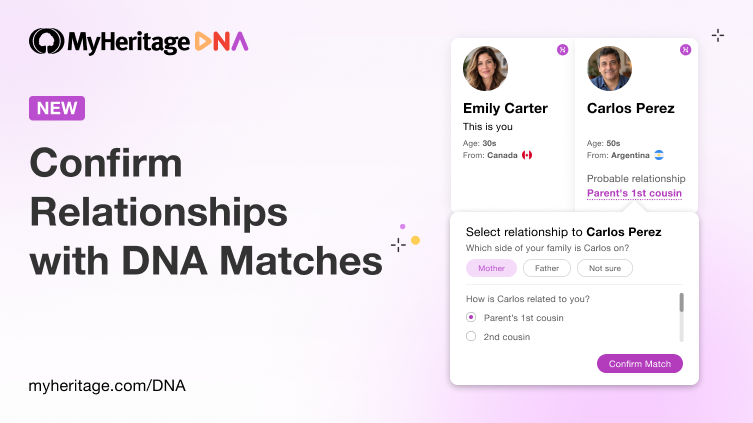
We’re pleased to introduce a highly requested new feature on MyHeritage: you can now confirm your known relationships with DNA Matches. If you already know that a DNA Match is your first cousin, for example, you can record that relationship on MyHeritage so it appears instead of the estimated relationship.
Known relatives serve as essential reference points in genetic genealogy. By comparing other DNA Matches with the relatives you have already identified, you can recognize groups of matches connected to particular branches of your family and better understand how unknown matches may be related to you. For example, if a known cousin on your mother’s side appears among the Shared DNA Matches you have with another person, that can provide an important clue that the new match is connected to the same side of your family.
By confirming known relationships and indicating which side of the family each match is on, you can organize your DNA Matches more effectively and put those valuable reference points to work in your research. Your annotations will be useful later on, when MyHeritage introduces new features such as inferring the paternal side for new matches and automatic chromosome painting. Confirming relationships will also help MyHeritage improve the accuracy of its relationship predictions in the future.
What’s new?
Until now, MyHeritage displayed a probable relationship for each DNA Match based on the amount of DNA you share, your age, and the age of your match. Now, with this new feature, you can replace that estimate with a relationship you already know to be correct, such as a first cousin or great-aunt, and indicate whether the match is related to you through your mother’s or your father’s side.
How to confirm a known relationship with a DNA Match
On your DNA Matches page, hover your mouse over the probable relationship and click the pencil icon, or click the relationship itself that appears with a dotted underline:

Confirming a relationship from the DNA Matches page (click to zoom)
A page will open that displays estimated relationships to this person and the probability of each one. Now comes the new feature: if you already know how you’re related, click “Select Relationship”.

Selecting a relationship from the relationship estimate pop-up (click to zoom)
You can also reach the relationship confirmation feature by clicking the pencil icon next to the estimated relationship in the Review DNA Match page:

Confirming a relationship from an individual DNA Match page (click to zoom)
Once you click “Select Relationship,” several options will appear. If known, select the side of the family this relative is on. Then, select the relationship among the options listed:

Selecting a known relationship (click to zoom)
Currently, it is not possible to select a relationship that is not among the options listed. This capability will be added in the future.
Once you have selected what you know about your relationship with this person, click “Save relationship.”
The relationship you selected will now appear on the DNA Match card, along with the side of the family you selected and a blue checkmark indicating that you confirmed this relationship.

A DNA Match with a confirmed relationship (click to zoom)
Confirmed relationships appear on the DNA Match card, on the Review DNA Match page, and when the relative appears as a Shared DNA Match while you review another match.
Cost and availability
Confirming relationships to DNA Matches is available to all MyHeritage DNA users, and is free.
Looking ahead
A confirmed relationship can provide useful context beyond a single DNA Match, and this is only the beginning.
In the future, we plan to show which side of your family other DNA Matches are likely connected to based on relationships you have confirmed, and allow you to link a DNA Match directly to the corresponding individual in your family tree, among other enhancements.
Summary
Known relatives are valuable reference points in genetic genealogy. Now you can identify them on MyHeritage by confirming how you are related and indicating which side of your family they belong to. This makes it easier to organize your DNA Matches and use established relationships to investigate new ones. It also paves the way to new enhancements that are coming up soon.
Visit your DNA Matches page to start confirming the relationships you already know. If you haven’t tested your DNA with MyHeritage yet, order a MyHeritage DNA kit to receive DNA matches and explore how you are related to them.






noelmcguigan
October 23, 2026
I was a member previously. I have done my DNA test through My Heritage.
I hit a brick wall.
I think I am related to a family in Wales. Is it possible for my Heritage to check through your system to see if that family (who have a serious heritage history possibly on My Heritage) have DNA testing done and if that family matches my DNA?