






I upgraded my free acct. and was supposed to get “priority support” but so far I’ve not been able to find a link to support and all my e-mails are still unanswered. The upgraded account is no different than the free account. If I can find a way to contact the company I intend to demand a refund.
New: Feature-Packed Profile Pages
MyHeritage.com is pleased to introduce revamped profile pages on your family site. Complete with a range of new and exciting features, the new profile pages on MyHeritage.com enable documentation of detailed biographical information of each family member and illustration of their most important life events on a world map.
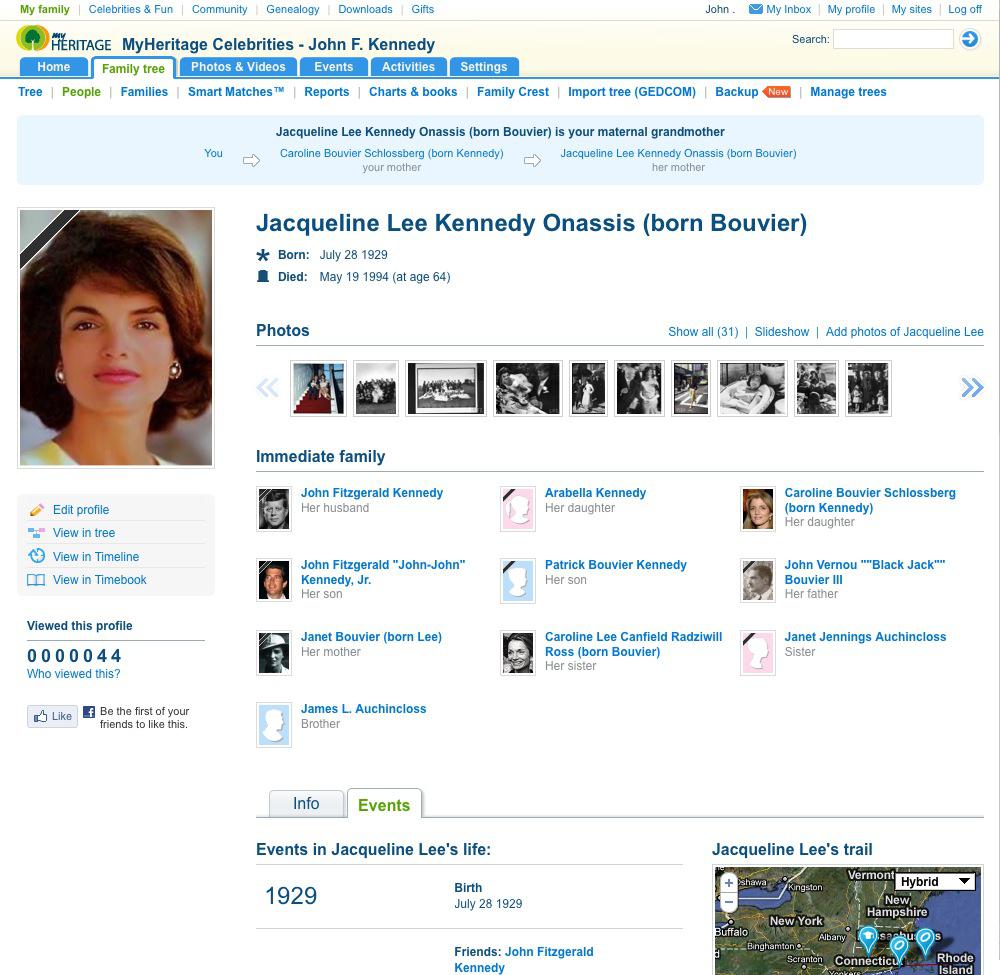
The new profile page of Jacqueline Kennedy (Click to enlarge)
The new profile page is designed to give you an overview of the life of any person in your family and the ability to quickly edit or add info as necessary. Therefore it has two different modes – the ‘view’ and the ‘edit’ mode. Let’s see how you can get to the profile page and what it can do in the view and edit modes.
You can access the profile page from the callout of any person (in the picture below on the right) – that speech bubble you see pretty much anywhere on your family site while hovering over a person’s name. From the family tree you can click on the ‘View profile’ button in the left panel (in the picture below on the left) to get to the persons profile, or find someone in the ‘people’ list of all your relatives (under ‘family tree > people’) and click on any name.
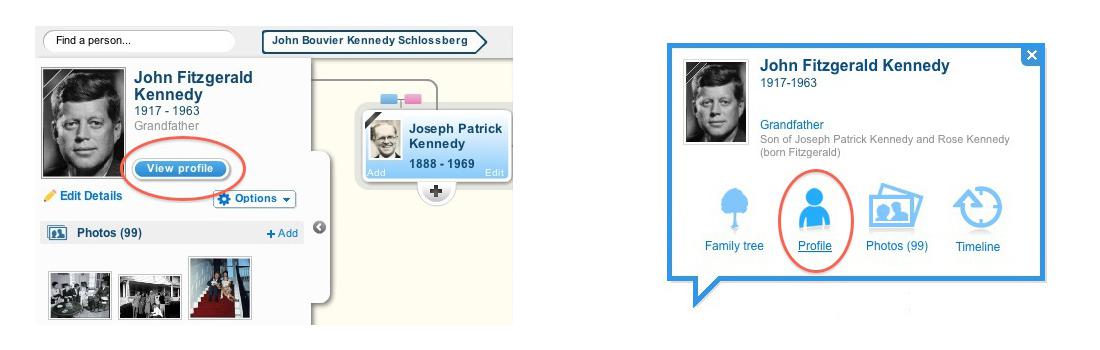
Access the new profiles from your tree or any callout (Click to enlarge)
You’ll first see the profile page in the ‘view’ mode. If your user account is linked to your profile in the tree, the profile page starts with a blue box showing you how you are related to that person. Besides you see a large profile photo, the full name, key dates and – if the person is signed up on MyHeritage – some info about their membership like how often they visited, if they are a site manager and the like. Upcoming birthdays are also highlighted here and you can send an electronic greeting or even purchase a gift via MyHeritage.com.
If a person doesn’t have a photo, you should add one – just click on the “Add photo” link in the silhouette and you can upload it directly from the profile page. Adding personal photos for every person in your family tree is warmly recommended, as it will transform your tree from a text-only, black & white listing, to a living, breathing and much more exciting visualization of your family. And if the person isn’t signed up at MyHeritage, just add the email address in the purple box below the name and click invite!
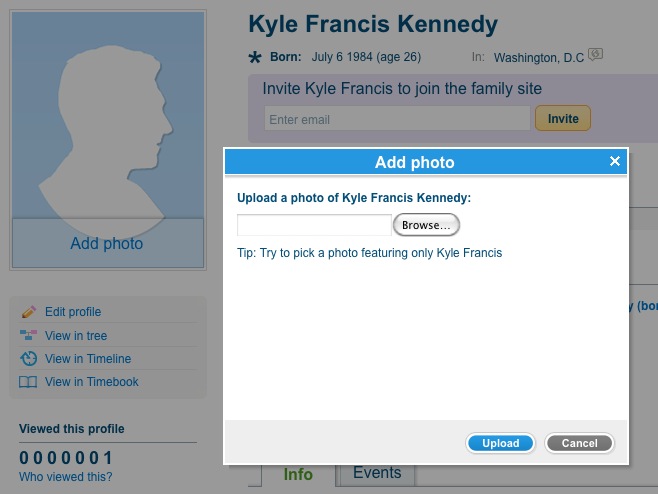
Add personal photo on the new profile page (Click to enlarge)
Right below the key facts on the new profile page you can see a list of all photos of a person with direct access to the photo management or the slide show. This is followed by a list of the immediate family (partners, kids, siblings, parents) – especially helpful if you look at distant relatives or ancestors, so you can quickly understand their family context. Click any immediate family member to jump directly to their profile.
The new profile page splits up in two small tabs, ‘Info’ and ‘Events’. The Info tab covers education, work, favorites, contact details, personal info and a biography. Underneath there is a guest book, where you can leave comments for that person, or share your memories if the person is deceased.
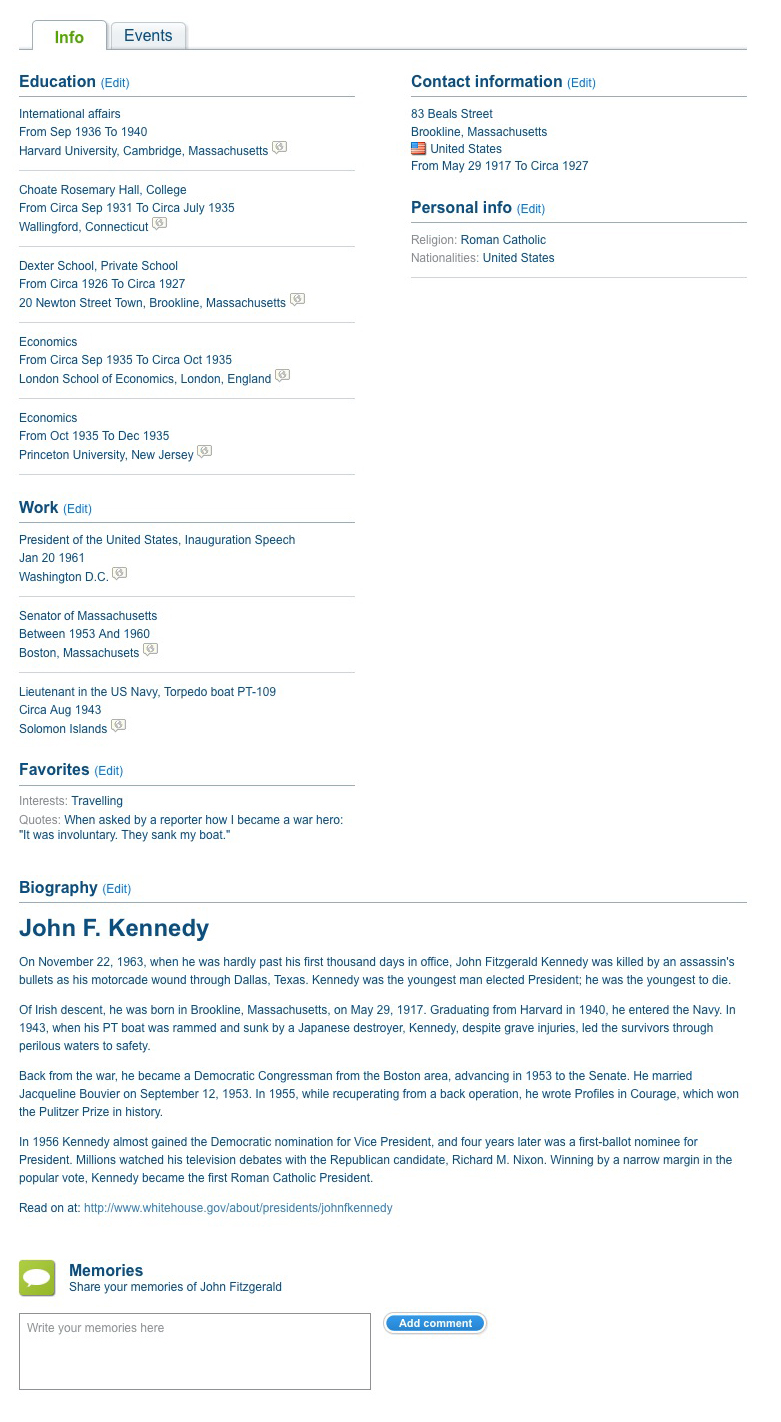
Get all the details: the Info tab (Click to enlarge)
The highlight of the Events tab is a chronological list of the most important events in the life of a person. Here you also see the map we mentioned earlier. In the example below you see John F. Kennedy’s life on a small map, that can be clicked to be viewed in full size. This ‘life trail’ shows births, marriages and deaths in the life of the person as well as close relatives, plus events that have location info such as residence, education and work.

Important events and the life trail of JFK (Click to enlarge)
Sometimes it’s the finer details of a person’s life that define and shape the character of the whole family. The new ‘edit mode’ of the profile page allows you to document everything that makes your relatives special directly on your family site (if you are not using the Family Tree Builder software). From adoptions and foster families to information such as education, career, special memories, favorite sayings, likes and dislikes, religious names or nicknames, you can enter all of it directly on the profile page. Click on ‘Edit profile’ below the personal photo on the left, or any of the small blue edit links further down on the page, to access the edit mode.
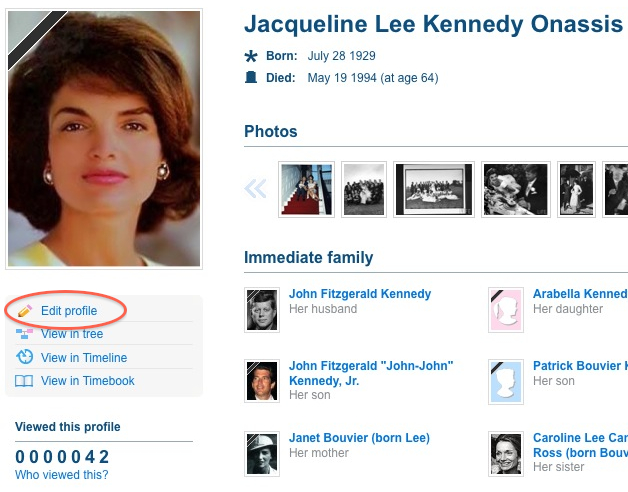
Clicking 'edit profile' will change to 'edit' mode (Click to enlarge)
The edit mode of the profile page has a grey bar on the left with the different topics in which you can add information. It starts with the ‘Essentials’ like the name with prefixes or suffixes, nickname, religious name or namesakes as well as birth and death information. A nice little helper is the new drop down which will give you all places that you’ve used anywhere else on the site, so you can just pick one instead of typing it over again.
‘Save & continue’ will always get you to the next topic, ‘Save & close’ returns back to the view mode of the profile page and ‘Cancel’ will discard your changes.
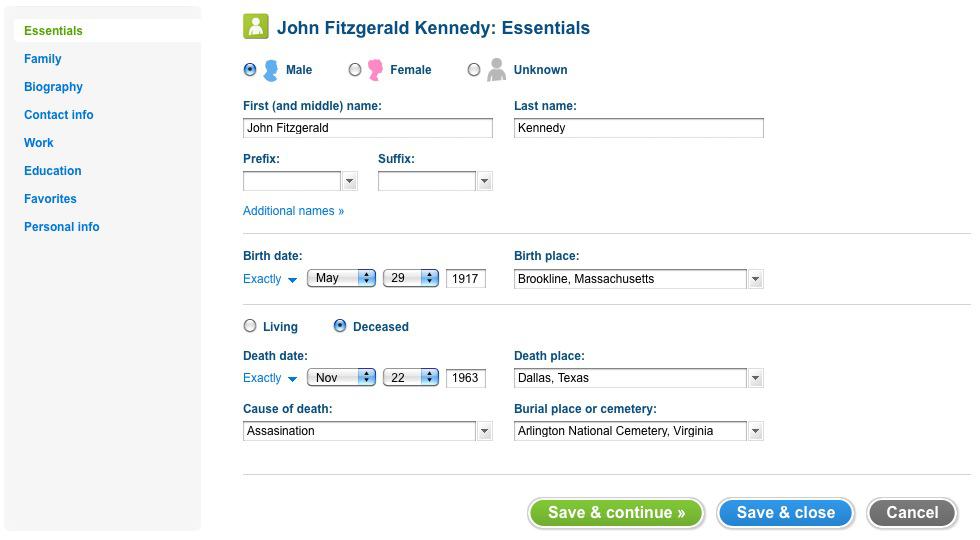
Edit the essentials of a profile (Click to enlarge)
The next page is for the key family info and lets you edit relationships to parents and partners. Adding new parents or partners is done in the tree itself, but you can refine that info here. Here you can specify if the person is a natural child, adopted or fostered; you can also specify the exact relationship of that person with any partner. Choose among marriage, divorce, separation, partners and similar options. Note that for the countries where this is common we allow adding date and place of a civil marriage as well as the religious marriage.
Then you can enter a full biography of a person, we offer you a complete text editor so you can mark stuff in bold, create a list, add images and the like. Next is the page with contact details. You can add as many addresses as you want and even date them, so it works well for people who moved around a lot during their life. You can fill only the city or a full address with zip and house number, but in any case we will try to show those places to you on the map. Obviously you can also add email, phone, fax and even any user names for messengers, social networks or URL for personal websites, Twitter accounts or the like. We’ll make those into links so you can quickly see your cousin’s tweets from the view mode.
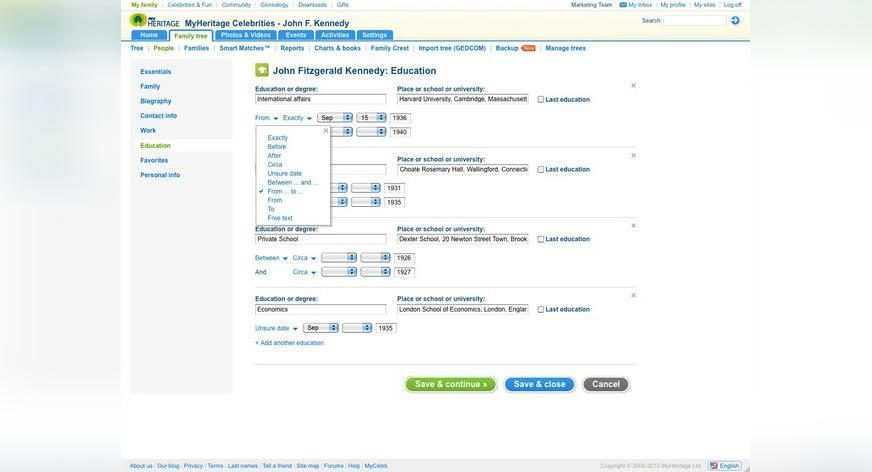
As you go back in time you’ll inevitably come across events in previous generations, such as births, marriages and deaths, where exact dates are unknown. Therefore we’ve made it possible to enter approximate dates such as ‘circa 1970’, ‘after August 1980’ or even complex dates such as ‘between January 15 1920 and before March 1921’. Corresponding to the GEDCOM format – such dates remain fully structured and can be automatically sorted, translated and searched. This is helpful with the ‘essentials’ but also with the next two pages where you can enter everything about work and education of your relatives and ancestors. The education dates of JFK for example are not quite certain. It is known that he went to London School of Economics and spent some time there with Harold Laski, but it’s uncertain when he decided to abort studies there and move back to the US where he subsequently enrolled at Princeton and Harvard.
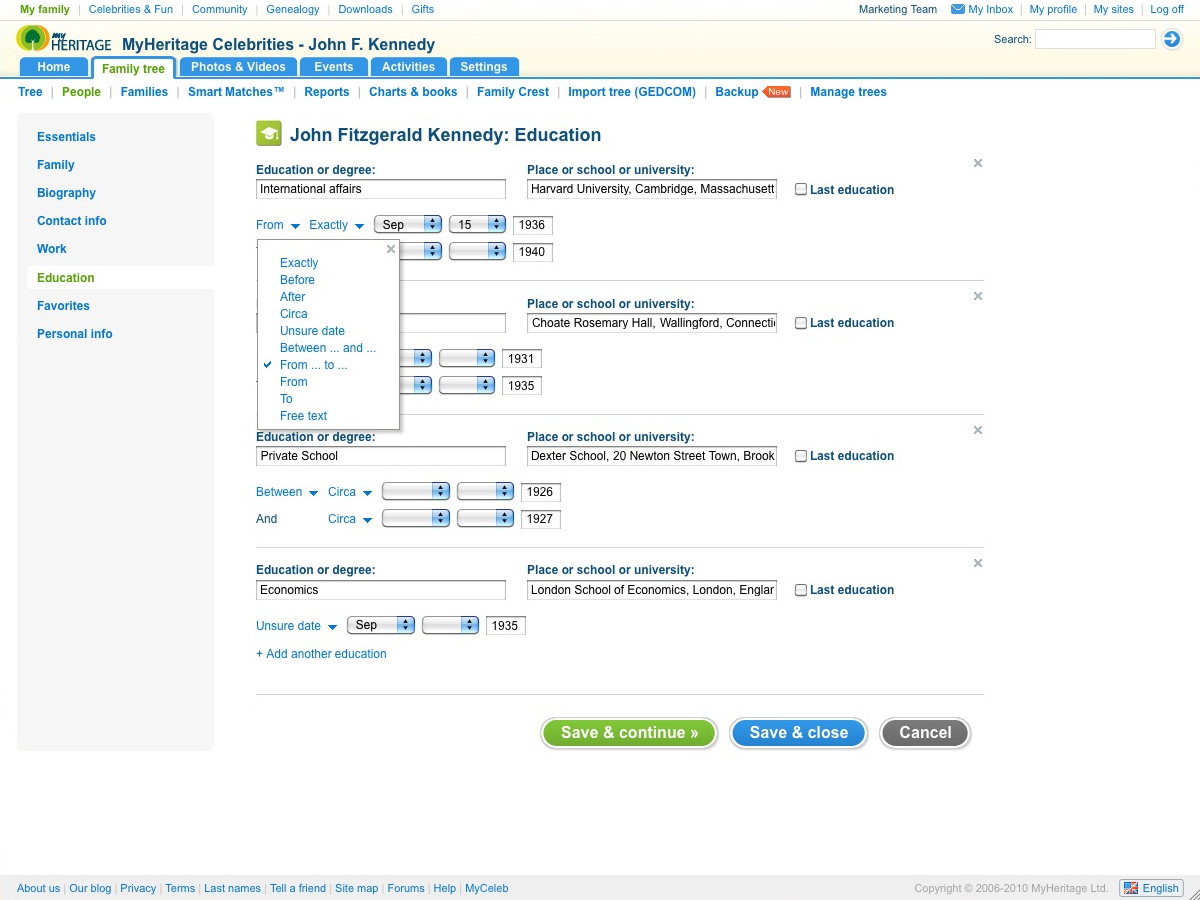
Flexible date entry on the new eduction page (Click to enlarge)
There are two more pages, the first for favorites to be filled with stuff like the basketball team you support, music, movies or TV shows you like and where you usually hang out. In the personal info you can also enter religion, nationalities, spoken languages and even nice details like hair or eye color. If you hit ‘Save & close’ you’ll get back to the view mode of the profile page and the new additions will appear there. By the way, most of the info will also show up in the left panel in your family tree.
If you have built your tree with our software Family Tree Builder (FTB) and published it to your family site, then changes to the data can only be made within your software. In this case the edit mode is disabled and you keep full control over all data on your own computer. Soon we plan to offer a full synchronization to users of FTB, so relatives online will be able to contribute data that you can then moderate and synch back into the software on your computer.
All of these new features are now live on the website, but they are just the tip of the iceberg! We have a full list of about 70 more improvements coming up. Some are more about multimedia like embedding HTML and YouTube videos directly into profile pages. Others are for the genealogists among you: you’ll be able to enter more than 100 new facts such as immigration and military service, enter custom facts of your own, add sources and citations, associate photos with any fact and enjoy smart mechanisms to validate information that you enter in more than 30 criteria and receive suggestions when the data may be wrong. And we’ll add some settings like how you want dates to be displayed throughout the entire site.
In short, we will continue to work hard to make these profiles the very best on the Web for families. We hope you’ll enjoy the new profiles released this week and please watch this space for more updates!



Eero Ignatius
July 29, 2010
It sure looks good – and so much like the profile page in GENI…! Let’s hope that both companies concentrate on improvement of websites and don’t intend to feed money in lawyers’ pockets by assuming copyright infringements. I am a paying Customer in both and appreciate the continuous improvement you’re doing.